
For a new clinician, a practice manager, or a growing medical group, getting ready to work with insurance plans involves several administrative steps that are easy to confuse. Provider enrollment and credentialing are closely connected, but they do not always mean the same thing. Credentialing generally focuses on reviewing a professional’s qualifications, while payer enrollment establishes a provider’s or organization’s participation and billing record with a health plan or public program. Contracting, network participation, and billing activation may add further steps.
The terminology is not perfectly uniform. Some commercial health plans combine credentialing and enrollment in one application or use the terms differently. Medicare and Medicaid have their own program-specific enrollment rules. This guide separates the main functions, explains where common systems fit, and gives practices a practical way to coordinate the work without assuming every payer follows one sequence. Understanding provider enrollment and credentialing as connected but distinct workstreams helps prevent a submitted form from being mistaken for a completed approval.

Quick Answer: Credentialing, Enrollment, Contracting, and Billing Activation
Credentialing is the evaluation of a provider’s professional qualifications and practice information. Depending on the payer and provider type, the review can include an active license, education and training, board certification where applicable, work history, malpractice coverage, sanctions or exclusions, and other required disclosures. The purpose is to determine whether the provider meets the plan’s participation standards. In this part of provider enrollment and credentialing, the key question is whether the payer or program has established the appropriate record.
Payer enrollment is the process of registering a provider, group, supplier, or practice location with a specific insurance plan or government program. The enrollment record connects identifying details—such as NPI, tax information, service location, ownership, and payment information—to the payer’s administrative and claims systems. In Medicare, enrollment is a defined CMS process handled through PECOS or the appropriate paper application.
Contracting is the agreement that governs network participation, such as contractual terms, reimbursement arrangements, and obligations. Billing activation is the operational point at which the relevant payer records, effective dates, claim-routing details, and practice systems are ready for claims under that arrangement. Depending on the payer, contracting and credentialing steps may overlap or happen in a different order.
In practical terms, manage provider enrollment and credentialing as related workstreams, not as one interchangeable checkbox. A provider may have verified qualifications but still need a payer enrollment record or a signed participation agreement. Conversely, an application may be submitted while credential review, missing-document follow-up, or contracting is still pending. Always confirm the status and effective date directly with the payer before treating a provider as ready to bill.
What Provider Credentialing Checks
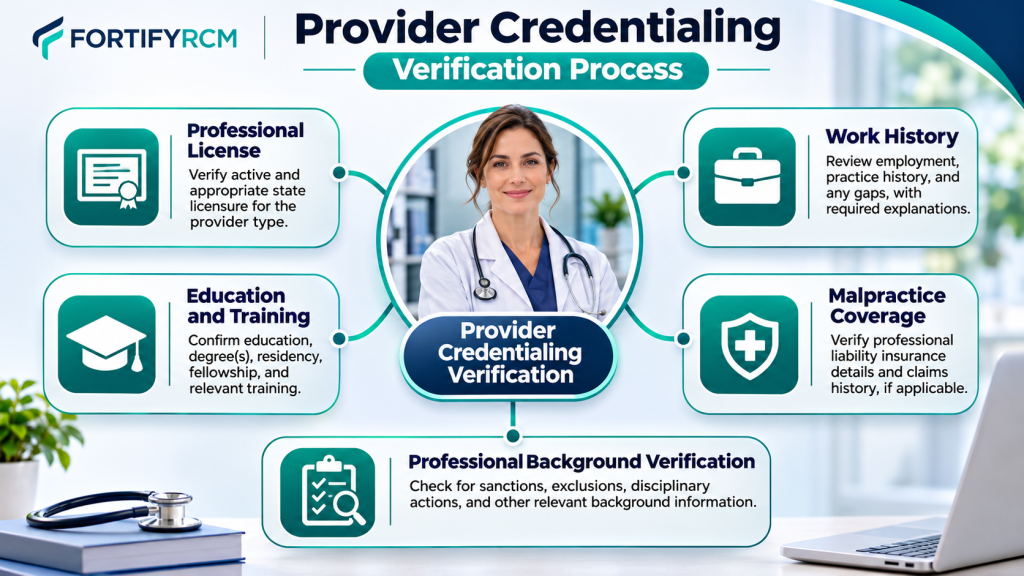
Credentialing focuses on whether a clinician meets a payer’s professional and participation requirements. The credentialing process in healthcare is payer-specific; the exact checklist depends on the provider’s license type, specialty, state, payer, and program. A physician’s documentation may differ from that of a therapist, nurse practitioner, dentist, or durable medical equipment supplier. Practices should use the specific payer’s current checklist rather than rely on a generic form found online.
Common credentialing review areas include:
-
Identity and professional qualification: Legal name, degree, training, specialty, and relevant professional identifiers.
-
Licensure and certification: Current state license and, when required by the payer or specialty, board certification or other credentials.
-
Practice and work history: Employment, training, practice locations, and explanations for gaps when requested.
-
Professional liability: Malpractice coverage details and claims history or disclosures where required.
-
Eligibility and integrity checks: Sanctions, exclusions, disciplinary actions, or adverse history as applicable to the payer’s process.
-
Practice information: Office locations, hospital affiliations, service details, and other information needed for the payer’s review.
The payer may verify information with the original issuing source or use an authorized credentialing verification organization. A provider data profile can make information easier to share, but the plan still applies its own requirements and decision process. For that reason, preparing provider enrollment and credentialing materials should include current, consistent records and a clear owner for responding to verification requests.
A complete file is not a promise of approval. The payer may request clarification, updated documents, or additional information, and its credentialing committee or delegated process makes the decision under its own standards. Practices should track what was submitted, when it was submitted, which source was verified, and what remains outstanding.
What Payer Enrollment Establishes
Enrollment creates or updates the administrative record that identifies who is participating with a payer and how that participation is structured. Medical provider enrollment can cover an individual clinician, a group, an organization, a supplier, or a location. Depending on the program and application type, the record may also capture relationships between individual practitioners and organizations. This is the payer-facing registration and affiliation side of provider onboarding.
The provider enrollment process differs by program and application category. For Medicare, CMS describes enrollment as the process through which providers and suppliers submit information to become Medicare participants and obtain the applicable billing privileges. CMS directs providers to obtain an NPI where required and submit the appropriate enrollment application through PECOS or by paper. The forms and supporting details vary by enrollment category. Clinics and group practices, physicians and non-physician practitioners, and institutional providers do not necessarily use the same application. Therefore, the Medicare portion of provider enrollment and credentialing should be checked against the correct provider or supplier category.
For Medicaid, provider screening and enrollment requirements are implemented by state Medicaid agencies under federal rules. States administer their programs, so application portals, documentation, provider categories, screening steps, and operational details can vary. A practice should review the requirements of each state Medicaid program in which it intends to participate. A single nationwide checklist should not be assumed to cover all Medicaid applications or all provider enrollment and credentialing.
Commercial payers set their own onboarding and participation processes. A plan may combine credentialing, enrollment, contracting, and roster submission into a single portal or sequence; another may separate them. The important question is not what the plan calls the process, but what has actually been completed and recorded for the provider, tax entity, location, and product/network. In commercial provider enrollment and credentialing, the payer’s own provider manual and written status confirmation are the controlling references.
Track separate outcomes where the payer provides them: credential review status, application status, contract status, effective date, and billing-system readiness. A confirmation that one stage is complete should not be interpreted as confirmation that every stage is complete. This separation makes provider enrollment and credentialing easier to audit and reduces confusion between approval, affiliation, and the start of billable participation.
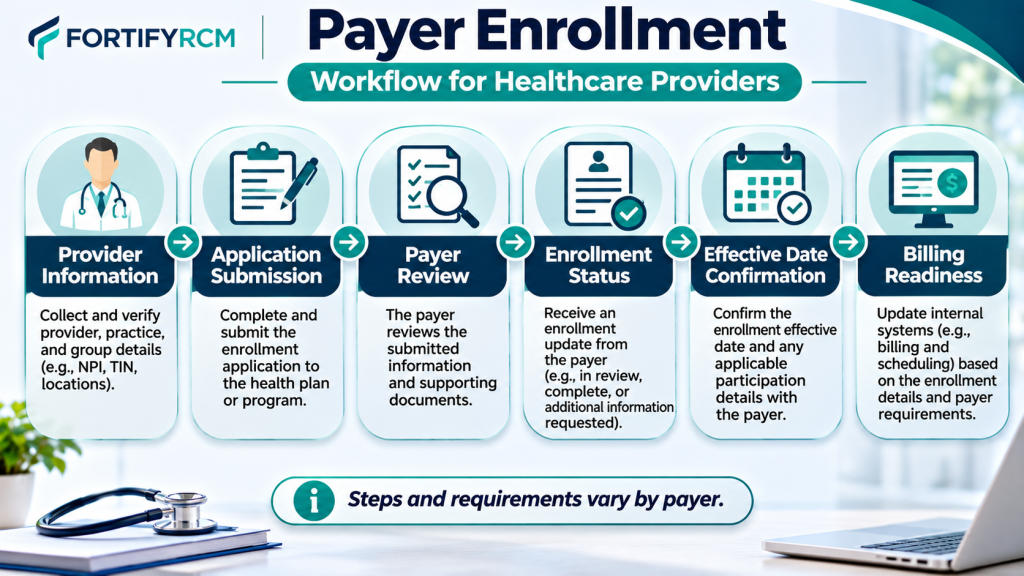
How Contracting and Network Participation Fit Between Approval and Billing
Credential review and enrollment are not always the final steps before a practice can submit in-network claims. Network participation may require an agreement between the practice or provider and the payer. The agreement can define reimbursement terms, covered products, participation obligations, administrative rules, and the effective date. The details are payer-specific and should be reviewed by the practice before acceptance.
Some commercial plans may begin credentialing before contract negotiation; others may coordinate the processes or issue a contract after credential review. Group practices may also need to confirm that the individual clinician is affiliated with the correct tax identification number, group, location, and network product. A clinician’s approval under one entity or location should not automatically be assumed to apply to every other affiliation. Practices should map these payer-specific relationships as part of provider enrollment and credentialing.
Before billing, confirm the following with the payer:
-
The provider’s credentialing review has reached the required outcome.
-
The individual and organization enrollment records are approved or active where applicable.
-
The provider is linked to the correct group, tax ID, service location, and network.
-
The participation agreement is executed when the payer requires one.
-
The effective date is documented and applies to the services and location involved.
-
Claim submission details, payer IDs, electronic transactions, and payment routing have been tested or confirmed as required.
This final verification is where provider enrollment and credentialing intersects with revenue-cycle operations. A practice can have a complete file and still face claim issues if a billing provider ID, rendering-provider link, location, contract status, or effective date is missing or inconsistent. Keep the payer’s written confirmation and update the practice management system only after the relevant details are verified.
Do not promise patients or staff that a provider is in-network based only on a submitted application, a CAQH attestation, or an informal phone update. Verify participation for the specific plan and product, then follow the payer’s instructions on when services may be billed as in-network. A final readiness check should close the loop between provider enrollment and credentialing, contracting, and the billing team.
Where CAQH, NPI, PECOS, Medicare, Medicaid, and Commercial Payers Fit
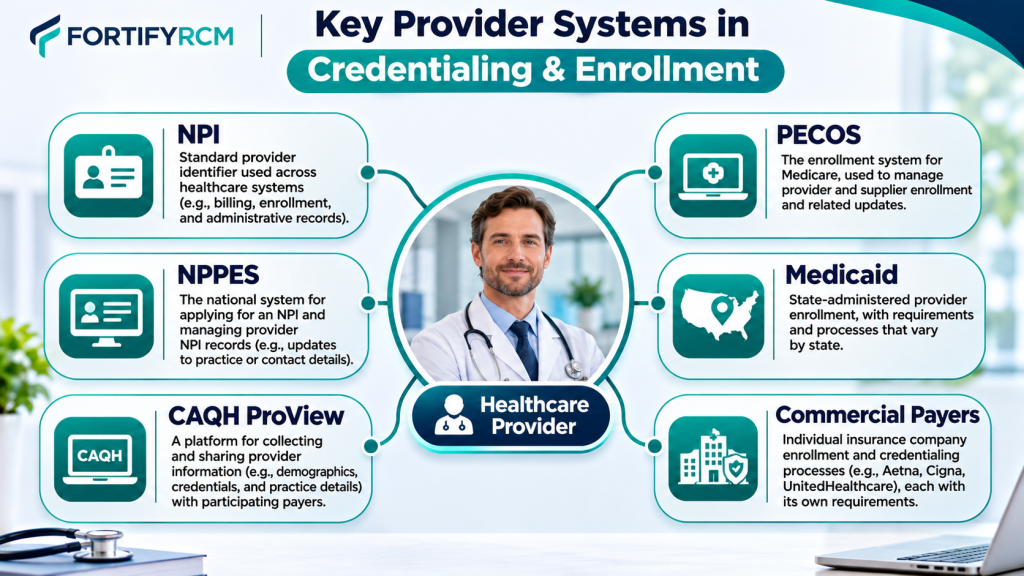
These systems and identifiers serve different purposes. Understanding their roles prevents a common mistake: assuming that completing one profile automatically completes all payer setup. Each item below has a separate role in provider enrollment and credentialing.
NPI and NPPES: Healthcare professionals need an NPI to be identified in standard healthcare transactions. CMS manages the application and recordkeeping process through its NPPES platform. Receiving this identifier does not confirm that a professional holds an active license, has passed a payer’s credential review, or has secured insurance network participation. Review or update NPI information through the NPPES system.
CAQH ProView. CAQH ProView is a provider data collection and profile platform. Providers can enter professional and practice information, authorize participating organizations to access the profile, attest to its accuracy, and maintain supporting documentation. Participating health plans may use the information as part of their credentialing or other administrative workflows. A completed CAQH profile does not by itself mean a payer has approved the provider, executed a contract, or activated billing. Follow the relevant plan’s instructions and keep the profile current. See the CAQH ProView provider guide. CAQH is a data-sharing tool within provider enrollment and credentialing, not a substitute for a payer’s decision.
PECOS and Medicare. PECOS is CMS’s online Medicare enrollment management system. Providers and suppliers use it to submit enrollment applications, review and update enrollment information, and complete revalidation actions. CMS explains the available enrollment routes and application categories in its Medicare enrollment application guidance. The appropriate route depends on the provider or supplier type and the action being taken. PECOS is the Medicare enrollment system—not a universal portal for all payer onboarding activity.
Medicare revalidation. Revalidation is a renewal of the Medicare enrollment record, not the same thing as an initial credentialing review. CMS generally requires providers and suppliers to revalidate every five years, while DMEPOS suppliers generally revalidate every three years; CMS may also request off-cycle revalidation. Check the provider’s due date and applicable instructions on the CMS revalidation page. Keep this recurring requirement on the provider enrollment and credentialing calendar.
Medicaid and commercial payer requirements. Medicaid provider screening and enrollment operate under federal requirements and state administration. CMS explains the program-integrity and provider-enrollment framework on its Medicaid provider screening and enrollment resource page. Commercial insurers maintain their own credentialing, contracting, roster, and enrollment rules. Do not assume that PECOS, CAQH, or another payer’s approval automatically carries over to a different plan. This payer-by-payer approach is central to accurate provider enrollment and credentialing.
In a coordinated workflow, the practice should maintain one source of truth for each provider’s identifiers, license dates, practice addresses, tax affiliations, payer applications, CAQH status, contracts, effective dates, and follow-up history. That record makes provider enrollment and credentialing easier to manage because teams can identify missing steps without confusing one system’s confirmation for another payer’s decision.
A Side-by-Side Comparison and a Coordinated Checklist
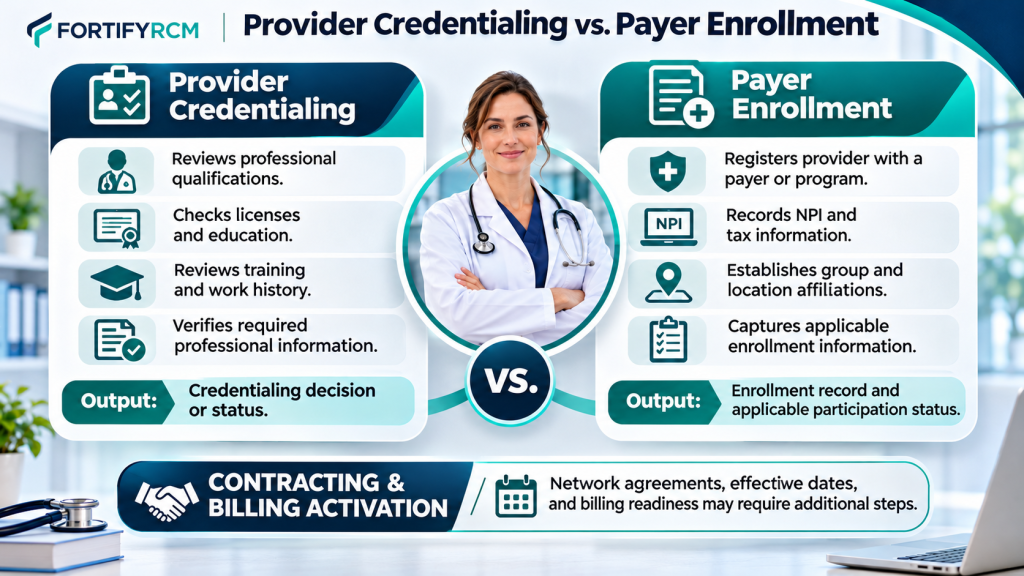
The table below summarizes the practical difference. It is a workflow guide, not a claim that every payer uses identical terminology or a single sequence. Use it to assign ownership for each stage of provider enrollment and credentialing.
| Area | Credentialing | Payer enrollment |
|---|---|---|
| Main question | Does the provider meet the payer’s professional standards? | Is the provider or organization registered with this payer/program for the applicable participation and billing relationship? |
| Primary focus | Qualifications, license, training, specialty, history, and required disclosures | Provider identity, NPI, tax details, group and location links, ownership, and program-specific data |
| Reviewing party | Payer, delegated credentialing entity, or credentialing verification organization | Payer enrollment team, government program, or designated contractor |
| Information used | Professional records and primary-source verification, as required | Application data, identifiers, practice details, ownership, affiliations, and supporting records |
| Typical output | Credentialing decision or status | Enrollment record/status and applicable billing privileges or payer participation record |
| Does it set reimbursement terms? | No, not by itself | Not necessarily; contracting or a separate agreement may define terms |
| Ongoing maintenance | Recredentialing or periodic updates under payer rules | Demographic changes, ownership/location updates, revalidation, and other program/payer updates |
What can go wrong when both workflows are treated as one task?
When a team uses a single “credentialing complete” status for every payer activity, it can miss important dependencies. A provider may have an active license and completed CAQH profile while the plan has not finished its review. A Medicare application may be submitted but still awaiting contractor review. A group may be enrolled while a new rendering provider has not been linked to that group. A contract may be signed, but its effective date may not yet have arrived. These are the kinds of handoff gaps a provider enrollment and credentialing tracker should expose.
Other common gaps include inconsistent legal names, incorrect NPI or tax ID, incomplete location data, expired licenses or insurance documents, unanswered requests for information, and a failure to update the practice management system after approval. These issues can cause onboarding delays, directory inaccuracies, out-of-network treatment, or claim rejections. The exact consequence depends on the payer’s rules and the facts of the case.
Coordinated checklist for new providers and new locations
Use this checklist for each payer and each relevant provider/location combination:
-
Confirm the legal name, individual NPI, organization NPI where applicable, tax details, taxonomy, and practice address.
-
Collect current license, education/training records, malpractice coverage, CV, and other payer-required documents.
-
Review the payer’s credentialing and enrollment instructions; identify whether the applications are combined or separate.
-
Complete and authorize the CAQH profile if the payer uses it; check that all requested sections and documents are current.
-
Submit the correct application for the payer, provider type, organization, and location.
-
Record submission dates, confirmation numbers, assigned contacts, missing items, and follow-up dates.
-
Track credentialing, enrollment, contracting, roster affiliation, and effective-date status separately.
-
Verify the approved provider, group, tax ID, location, network/product, and billing instructions with the payer.
-
Update scheduling, eligibility, billing, and practice-management systems only after the correct status and effective date are confirmed.
-
Calendar recredentialing, revalidation, license renewal, and payer demographic-update deadlines.
A well-maintained tracker makes provider enrollment and credentialing easier to manage because everyone can see which step is pending, who owns it, and what evidence is still needed. It also provides a useful record when a payer asks for an application date, document, or prior confirmation.
Specialties We Serve
Credentialing and payer enrollment needs vary by provider type, service model, state, and payer mix. Fortify RCM lists support for a range of healthcare professionals and organizations,
Mental Health Providers
Credentialing and billing for psychologists, therapists, counselors, and social workers in private or group practice.
Nutritionists & Dietitians
Specialized RCM and credentialing support for MNT providers, licensed dietitians, and wellness nutritionists.
Occupational Therapists
End-to-end billing and enrollment services for pediatric and adult OT clinics and independent therapists.
Non-Emergency Medical Transportation (NEMT)
We handle Medicaid credentialing, EDI setup, and claims billing for NEMT providers.
Home Health Agencies
Complete RCM services tailored for HHAs including Medicare credentialing, OASIS billing, and claims management.
Skilled Nursing Facilities (SNFs)
Credentialing, billing, and AR support for SNFs—compliant with payer-specific guidelines and long-term care needs.
Applied Behavior Analysis (ABA)
We support ABA therapy providers with credentialing, insurance billing, authorization and appeals for denied behavioral health claims.
Chiropractors & Physical Therapists
Credentialing and billing help for musculoskeletal therapy, rehab clinics, and solo practitioners.
Durable Medical Equipment (DME) Providers
We handle Medicare/Medicaid credentialing, EDI setup, and claims submission for DME suppliers.
Nurse Practitioners & Physician Assistants
Complete credentialing and billing support for NPs & PAs operating independently or in group practices.
Dentists & Oral Health Providers
Support with dental insurance credentialing and claims processing for general dentists and specialists.
Vision & Eye Care Specialists
Credentialing and RCM services for optometrists, ophthalmologists, and vision therapy providers.
Frequently Asked Questions
1. Is provider credentialing the same as payer enrollment?
No. Credentialing generally reviews a provider’s qualifications and whether the provider meets a payer’s professional standards. Enrollment establishes the provider’s participation or administrative record with a specific payer or program. Some commercial plans combine both into one process, so confirm what each plan has actually completed. Provider enrollment and credentialing are connected, but one status should not automatically be treated as proof of the other.
2. Does a CAQH profile mean a provider is enrolled with an insurer?
No. CAQH ProView stores provider information and lets authorized participating organizations access it. A provider may need to authorize the payer, complete attestations, and provide documents, but the insurer still applies its own credentialing and enrollment process. A CAQH profile is not a payer approval or contract.
3. Is Medicare enrollment different from commercial insurance credentialing?
Yes. Medicare enrollment is a CMS-defined process that generally uses PECOS or the applicable paper application and follows Medicare-specific requirements. Commercial payers set their own credentialing, contracting, roster, and enrollment workflows. Medicaid is administered by states under federal requirements, so its procedures also vary by state. Separating these responsibilities gives practice administrators a clearer way to organize applications, monitor payer requirements, and manage provider enrollment and credentialing.
4. Can a practice bill before the payer effective date?
Do not assume that it can bill as an in-network provider before the payer’s applicable effective date. The answer can depend on the payer, contract, provider type, claim circumstances, and program rules. Confirm the effective date and billing instructions directly with the payer before submitting claims or representing the provider as in-network. This final check is a critical handoff from provider enrollment and credentialing to billing operations.
5. Does an NPI mean a provider is credentialed?
No. CMS states that issuing an NPI does not ensure or validate that a healthcare provider is licensed or credentialed. An NPI is an identifier used in standard healthcare transactions; it does not replace credential review, payer enrollment, or contracting.
6. How often must Medicare providers revalidate?
CMS generally requires Medicare providers and suppliers to revalidate every five years. DMEPOS suppliers generally revalidate every three years, and CMS can request off-cycle revalidation. Always check the current due date and instructions for the specific enrollment record.
Coordinate Your Credentialing and Enrollment Workflow With Fortify RCM
When credential review, payer applications, contracting, and billing setup are tracked in different places, it becomes difficult to see what is complete and what still needs attention. A coordinated provider enrollment and credentialing workflow helps a practice organize provider documents, confirm payer-specific requirements, follow up on pending requests, and record effective dates before billing begins.
Fortify RCM provides credentialing and enrollment support for individual providers and group practices, including CAQH profile assistance, payer application coordination, Medicare and Medicaid enrollment support, recredentialing, and payer follow-ups, as described on its credentialing services page. Scope and availability should be confirmed for the provider type, payer, state, and practice location.
If your team is unsure whether a provider has completed credentialing, payer enrollment, contracting, or billing activation, start by mapping the outstanding steps for each payer. Visit the Fortify RCM pricing page for current service information, learn more about Fortify RCM, or contact the team to discuss your workflow. A focused review can help clarify responsibilities and identify the next administrative steps—without assuming that any approval or effective date is guaranteed.